Idle Mafia Game Controls
Idle Mafia Game controls and HUD: rail tabs, Energy bars, territory zoom, Shop, and settings on Roblox PC and mobile.
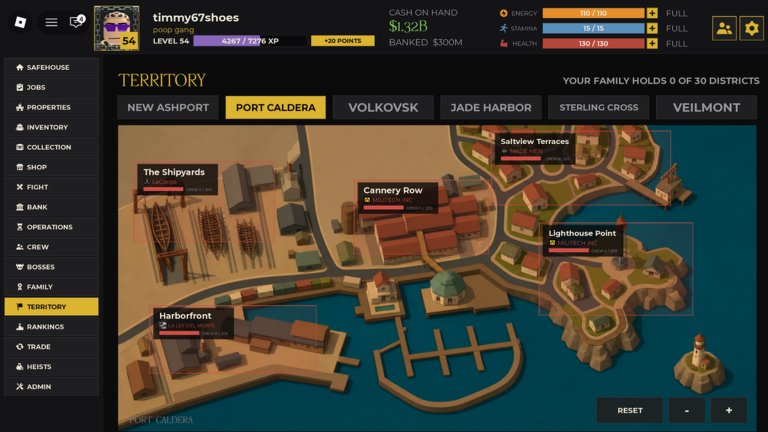
Idle Mafia Game controls are mostly UI. This is a 2D persistent office, not a third-person Roblox shooter. If you came here looking for shift-lock binds, you are in the wrong place. If you cannot find Heists, Bank, or the code box, you are in the right place.
Top HUD
Left: avatar, level, XP, unspent points. Center: cash on hand and banked cash. Right: Energy, Stamina, Health, plus the player list and settings cog. Click the cog for volume, graphics, and any promo field documented in how to redeem codes.
Left rail
Safehouse, Jobs, Properties, Inventory, Collection, Shop, Fight, Bank, Operations, Crew, Bosses, Family, Territory, Rankings, Trade, Heists, Admin. A red pip on Operations means claim it. Admin is not a cheat menu — it is account/help. Heists appear after the late-August patch; if you do not see them, you are on an old session and should rejoin.
Territory map
City tabs across the top: New Ashport, Port Caldera, Volkovsk, Jade Harbor, Sterling Cross, Veilmont. Reset recenters. Plus and minus zoom. Click a named district to inspect buy-in, claim, or contest. This is the same map discussed in the map guide.
PC versus mobile
PC: mouse for every tab, scroll for long Job lists, keyboard for Roblox chat only. Do not bind Fight to a spam key — Stamina is the limiter. Mobile: the rail collapses; use the hamburger equivalent in the client to reopen Jobs. Long-press to paste codes. Zoom on Territory uses the on-screen plus/minus, not a pinch that fights the Roblox camera.
Crew, Inventory, and Collection are grids. Drag to equip if the client allows it; otherwise use the Equip button. Auto-equip from a script bypasses that grid. Shop is a cash/Robux grid. Bank is a deposit/withdraw pair. Treat Bank like a control you hit every session, not a menu you visit once.
Common “broken control” reports
Map not dragging: use zoom buttons. Heists greyed out: bars too low or tutorial flags. Fight does nothing: Stamina empty. Family empty: you are not in a roster, see join a Family. These are systems, not keybinds. For the first-hour order, go back to the walkthrough.
Chat is the most dangerous control on the screen. Codes pasted there are public on a 15-player instance. Loadstrings pasted there are worse. Share Family invites in a private channel from the community page. On a small laptop, scroll the rail: Heists and Admin live at the bottom. Horizontal overflow on city tabs is a zoom problem, not a missing city. If clicks die, a Roblox chrome menu is probably sitting on top of the HUD — close that first.
Frequently asked questions
Quick answers to the most common questions.
Is there a run key?
No character sprint. You click menus on a persistent map.
Can I rebind Energy spend?
No. Jobs spend Energy when you confirm the job.
Where is chat?
Standard Roblox chat. Do not paste codes there.